use Joomla\CMS\Uri\Uri;
When small North Carolina businesses get started, they typically focus on how to land their first clients. Often they will rely on traditional forms of advertising, such as coupon mailers, billboards, out-of-home, or print ads. While many small businesses think that because they provide a superior product or service, it is only a matter of time before prospective clients will find their way to them.
While this strategy may bring in a small amount of revenue, there is a better and easier way. Small businesses should think about leveraging the power of the internet to reach prospects online and reap the benefits of combining traditional and digital marketing. No small business, no matter how new, should disregard digital channels as a source of leads and the conversion of interest into clients.
Still not convinced? Think about this over 94% of business-to-business (B2B) buyers do research online, whereas your business-to-consumer (B2C) buyers research online 97% of the time before making a decision.
Unfortunately, if you rely only on traditional methods, you miss out on a significant portion of your potential clientele.

Written By: Chad J. Treadway | May 17, 2023
Chad is our Chief Smarketing Officer. He will help you survey your small business needs, educating you on your options before suggesting any solution. Chad is passionate about rural marketing in the United States and North Carolina. He also has several certifications through HubSpot to better assist you with your internet and inbound marketing.

When you think of rural America, you might often think of large farms where your nearest neighbor may be several miles away, rugged terrain where the roads are so curvy you can see your own brake lights, or it might be just sparse deserts.
Regardless of how you view rural America, I have compiled a list of seven statistics and facts about rural America into one infographic.
Written By: Chad J. Treadway | May 15, 2023
Chad is our Chief Smarketing Officer. He will help you survey your small business needs, educating you on your options before suggesting any solution. Chad is passionate about rural marketing in the United States and North Carolina. He also has several certifications through HubSpot to better assist you with your internet and inbound marketing.

Building a technical team from the ground up must be done as intentionally and systematically as possible. You have to know exactly what you want and what your business needs. Then you start tracking down the relevant talents for your team.
A technical team is essential to your business because they are directly involved in the technological development of your product. The team helps your business navigate the Tech market and usually consists of engineers, network architects, UI/UX designers, analysts, and hardware experts. Depending on what service your company offers, your technical team could be just two software engineers in a shared working space or a third-party organization where you outsource your technological needs. However, as a business owner, you can choose to build your team in-house.
Written By: Chad J. Treadway | May 08, 2023
Chad is our Chief Smarketing Officer. He will help you survey your small business needs, educating you on your options before suggesting any solution. Chad is passionate about rural marketing in the United States and North Carolina. He also has several certifications through HubSpot to better assist you with your internet and inbound marketing.

The key to increasing your Asheville area small business’s clientele is through marketing, primarily content marketing. With content marketing, you are telling your business’s story in such a way that it attracts prospects, educates them, and entices them to choose your WNC small business.
Now, there are numerous options for small businesses to get the word out, but content marketing is one of the better and more cost-effective ways to differentiate yourself and your business from the competition.
As prospects begin their search for services or products, they have several questions, such as:
- What distinguishes your Asheville small business from the one down the street?
- What are the criteria for hiring employees?
- What is the business’s mission/philosophy?
- How much can clients be involved, and what role can they play?
- What are the expectations for communication with clients?
- What results can we expect if we use your services or products?
- What are the business’s difficulties? What are the areas that need to be improved?
Your marketing materials, website, social media presence, and personal interactions should all follow a consistent theme and work to answer these questions.
Ensure you deliver on what you promise regarding what you say and do. This will not only reassure clients, but they will also be able to see the quality of your services or products.
You can and should create buyer personas to help you focus your marketing efforts. Defining an ideal client will help you develop marketing content and collateral that speaks directly to them.

Written By: Adam Bennett | May 03, 2023
Adam is the president and founder of Cube Creative Design and specializes in private school marketing. Since starting the business in 2005, he has created individual relationships with clients in Western North Carolina and across the United States. He places great value on the needs, expectations, and goals of the client.

As we emerge from the COVID pandemic and many restrictions have been lifted, small businesses are trying to return to normal. However, one thing that has fundamentally changed is not only the need but the necessity of a strong internet presence.
Before many, many small businesses could get away with a simple website or “have a Facebook page,” and that was all they needed to “show up on Google” or get found. Unfortunately, that isn’t the case; things have changed. Your clients will first look you up in various places and do their research before contacting you.
You need to employ several different techniques to ensure you show up. Content marketing is one of the best. Content marketing is about creating value, relevance and attracting prospects with content that answers people’s questions. But you also need to promote it. Therefore one of the best tools for that is social media.
It wasn’t long ago that social media was viewed as a way for people to stay in touch and play games. But now, it has become a powerful marketing tool. Take a look at these statistics:
Written By: Chad J. Treadway | April 26, 2023
Chad is our Chief Smarketing Officer. He will help you survey your small business needs, educating you on your options before suggesting any solution. Chad is passionate about rural marketing in the United States and North Carolina. He also has several certifications through HubSpot to better assist you with your internet and inbound marketing.

When done correctly, a content marketing strategy can significantly impact your small business’s brand exposure and reputation. It can also boost your client interactions and drive higher-quality traffic to your small business website.
Now I realize that that one statement might not be enough to convince you. Therefore let me provide you with these:
- Researchers expect the content marketing industry to generate a revenue of nearly $140 million by 2026. (Source: Business Report by Research Dive)
- Nearly 3 out of 10 businesses will spend less than $1,000 monthly on content marketing, whereas almost 5 out of 10 will invest $1000-$5000 monthly. (Source: State of Content Marketing: 2023 Global Report)
- Almost 7 out of 10 businesses plan to increase their content marketing budgets in 2023 (Source: State of Content Marketing: 2023 Global Report)
- 7 out of 10 B2B and B2C marketers use content marketing as part of their overall marketing strategy. (Source: Content Marketing Institute B2B 2022 Research Report and Content Marketing Institute B2C 2022 Research Report)
Given those statistics, I hope you realize that content marketing is one of the most efficient and cost-effective ways to build awareness, boost sales, and grow your small business.
This begs the question of how effective is your content marketing strategy.
If you answered very effectively or effectively, congratulations, you are well on your way. However, if you answered it’s not or what is a content marketing strategy, then you have come to the right place.
Written By: Chad J. Treadway | April 24, 2023
Chad is our Chief Smarketing Officer. He will help you survey your small business needs, educating you on your options before suggesting any solution. Chad is passionate about rural marketing in the United States and North Carolina. He also has several certifications through HubSpot to better assist you with your internet and inbound marketing.

Small businesses often face the challenge of limited resources, making marketing a crucial aspect of their growth strategy. By implementing effective marketing tactics, small businesses can significantly impact their target audience, drive sales, and increase brand awareness. In this post, we’ll explore the foundations of small business marketing and how it differs from marketing for larger enterprises.
One common misconception is that small businesses don’t need marketing. However, this couldn’t be further from the truth. Regardless of size, marketing is essential for any business, and small businesses can greatly benefit from targeted efforts that cater to their unique needs and goals. By addressing these misconceptions head-on, we can uncover the true potential of small business marketing.
It would be best to consider several things when building a winning marketing strategy for your small business. Here are my top five strategies:
Written By: Chad J. Treadway | April 17, 2023
Chad is our Chief Smarketing Officer. He will help you survey your small business needs, educating you on your options before suggesting any solution. Chad is passionate about rural marketing in the United States and North Carolina. He also has several certifications through HubSpot to better assist you with your internet and inbound marketing.

If you are a rural small business or a rural service area business, you know that showing up on Google can be difficult at best. I am not going to lie. Showing up in Google’s local pack is nearly impossible. Mainly because you can’t get a Google Business Profile (GBP) listing in a town you don’t have an address in. However, it is possible to take over the top rankings for local organic results on the search engine results pages (SERPs).
Written By: Chad J. Treadway | April 12, 2023
Chad is our Chief Smarketing Officer. He will help you survey your small business needs, educating you on your options before suggesting any solution. Chad is passionate about rural marketing in the United States and North Carolina. He also has several certifications through HubSpot to better assist you with your internet and inbound marketing.
If you analyze how affiliate marketers do keyword research for their sites, you will see that they do it wrong. They start with exploring low competition keywords. Then they create content and place as many affiliate links as they can.
Yes, this way will result in a huge spike in traffic. But there won't be any affiliate link clicks. As a result, it leads to zero conversions and no revenue.
It’s an amateur blogging mistake. How to solve this issue then?
Figure out keywords that have a high level of search volume. These keywords should cover the topics that will allow you to place a link to your product or service.
Besides, you can't forget about search intent. It plays a key part in the entire process. For instance, someone exploring information about "the best content design tool". This person wants to find out the pros and cons of the tool and buy it one day. Hence, it makes sense to place your affiliate link using this anchor.
However, if the person wants to find out "what is a content design tool", it is a whole different kettle of fish.
In this post, you will get familiar with four types of affiliate keywords you should target in your strategy.
Let's cut to the chase!
Written By: Chad J. Treadway | April 10, 2023
Chad is our Chief Smarketing Officer. He will help you survey your small business needs, educating you on your options before suggesting any solution. Chad is passionate about rural marketing in the United States and North Carolina. He also has several certifications through HubSpot to better assist you with your internet and inbound marketing.

In today’s digital world, local SEO is crucial in helping businesses reach potential customers in their area. A staggering 9 out of 10 search engine users look for local businesses online, and nearly 5 out of 10 Google searches focus on finding local information. If your business isn’t ranking well in local search results, you could miss out on valuable clients and opportunities. Local Search Engine Optimization, or Local SEO, is a strategy that improves your rural small business’s online visibility by optimizing your content, social profiles, links, and citations for local search.
As a local rural business, utilizing local SEO techniques is essential for increasing your chances of survival in a competitive market. In this post, I will explain what local SEO is and how it works and provide tips and tricks to help you optimize your rural small business website for local search.
Written By: Chad J. Treadway | April 05, 2023
Chad is our Chief Smarketing Officer. He will help you survey your small business needs, educating you on your options before suggesting any solution. Chad is passionate about rural marketing in the United States and North Carolina. He also has several certifications through HubSpot to better assist you with your internet and inbound marketing.

Search engine optimization (SEO) is crucial for the success of any business, regardless of size or location. At a high level, on-page SEO optimizes your website’s content and structure. In contrast, off-page SEO focuses on the actions and factors outside your website that can impact its visibility and ranking in search engine results pages (SERPs). This post will explore the importance of off-page SEO and how it can benefit your rural small business.
Written By: Chad J. Treadway | March 06, 2023
Chad is our Chief Smarketing Officer. He will help you survey your small business needs, educating you on your options before suggesting any solution. Chad is passionate about rural marketing in the United States and North Carolina. He also has several certifications through HubSpot to better assist you with your internet and inbound marketing.
There is a famous quote from a keynote that the late Cindy Li said, “We’re all just temporarily abled.”
Before you read any further, please think about that. A profound statement, is it not?
That being said, website accessibility is critical to today’s web design and development. Not only does it ensure that your website is inclusive and usable for people with disabilities, but it can also positively impact your search engine optimization (SEO) efforts.
Disabilities come in all shapes and sizes and are part of being human. According to the World Health Organization (WHO), 1 out of every 6 people worldwide has a significant disability. The US Centers for Disease Control and Prevention (CDC) says that 1 in every 4 adults in the US has some disability. It is also highest in the south.
Vision and Our Perception of Color in Relation to Web Accessibility

Regarding web design and accessibility, the biggest issue is vision and our perception of color. Don’t get me wrong, I am not trying to downplay mobility or hearing issues as they are part of this, but because a website is such a visual medium, let’s focus on that for this post.
How We See Color
Bare with me as we wade into the science of how we see color. The light is reflected back to your eyes when you see something (no pun intended). Within your eyes are two types of light-detecting and responding cells, rods and cones. When you’re in low or dim light, rods are engaged. In brighter conditions, cones are stimulated. There are around 6 million cones and 110 million rods in your eyes, helping send the right information to your brain so it can see clearly.
If you were to see something like a falling autumn leaf, the brain processes the number of cones that were stimulated and the quality of their signal. Once your brain has interpreted those nerve impulses, it sees a color.
If you see the leaf in the light of day, it will appear red, orange, yellow, or green. If you see that same leaf at night, it will just appear as some shade of gray.
Color Is a Matter of Perception
Do you remember the controversy about the dress a few years ago? Was it white and gold or black and blue? While you may have strongly disagreed with someone you know about the color combination, most people sense colors similarly. What you see and perceive as red will be the same as what your friends see and experience as red. Our experiences have everything to do with how we all agree on what color is what.
Your previous visual experiences with items and objects influence your color perception. This is referred to as color consistency. Color constancy ensures that the apparent color of an object remains consistent under changing lighting conditions.
Regarding color impairment or color blindness, approximately 1 out of 200 women and 1 out of every 12 men have it. (Source: Colour Blind Awareness) Those who suffer from it are unaware that the colors they perceive as identical appear differently from others.
While those of us who don’t suffer from this tend to think that we go through life and everything is black and white, like how dogs and cats see it, both are myths. (Source: Color Matters) In reality, it is much more complex, and there are different types of color blindness that influence how someone with the condition sees colors.
Color and Genetics

If you struggle with color blindness, you may or may not be aware that your color vision differs from that of others. Until you have your eyes tested and discover that your color perception is abnormal, the colors you see are natural to you.
Color blindness is typically genetic. A recessive gene determines it on the X chromosome, one of the two sex chromosomes - Y being the other. Approximately 8% of men are color blind, while only 1% of women are. Genes tell us why.
Women have two X chromosomes, while men have an X and a Y. Now, to be colorblind, women must have two copies of the gene. If they have one copy, they can be carriers of the condition without symptoms (this means they may pass it on to their children. Most children get their X chromosome from their mother). Men, on the other hand, will be colorblind if their single X chromosome contains the gene. This is why the condition is much more prevalent among males.
If you are born with color blindness, it will not get better or worse throughout life. It just is. However, it is possible to develop an acquired color blindness. This affects men and women at the same rate. It can be caused by accidents or strokes that damage the retina or specific areas of the brain/eye. Some antibiotics, barbiturates, anti-tuberculosis drugs, high blood pressure medications, and drugs used to treat nervous disorders can also cause acquired color blindness.
What Is Color Blindness Accessibility in Website Design?
Color blindness accessibility in web design and development refers to developing aspects of your website so that those who cannot differentiate the entire color spectrum can still use and enjoy your website as intended. In other words, color accessibility deals with the text color, background color, saturation, patterns, text size, and size-to-contrast ratio.
One way color accessibility is measured is with the Web Content Accessibility Guidelines (WCAG) for contrast and color. There are three levels, A, AA, and AAA, which regulate color definitions, minimum contrast ratios by font size, and other factors. These standards can be used for any type of information on your website - practically anything a user needs to view and navigate.
4 Types of Color Blindness
Red and Green (Protan) Color Blindness
Protan Color Blindness (“pro-tan”) or Red and Green Color Blindness is, by far, the most common form of color blindness. This is caused by a Long Wavelength Light (L) cone abnormality. This is commonly seen as red light and is primarily responsible for seeing red hues.
Additionally, Protan Color Blindness causes a person to see reds, greens, yellows, oranges, and browns similarly. This is especially the case in low-light situations. Another issue is that purple colors appear bluer than purple or pink colors appear gray, especially when they are more reddish pink or salmon in color.
Protan color blindness accounts for approximately 25% of all cases of red-green color blindness.
Blue and Yellow (Tritan or Tritanomaly) Color Blindness
Tritan (“try-tan”) or Tritanomaly is much rarer than red and green colorblindness. Tritan color blindness is usually acquired later in life due to aging eyes, cataracts, glaucoma, age-related macular degeneration, or medical diseases. It is only extremely rare that it is inherited at birth.
Tritan results from a reduced sensitivity in the Short Wavelength Light (S) cone cells, and with this condition, the blue cones aren’t working correctly, so a person will see a rainbow of browns, pinks, and teals. Additionally, people will confuse blue with green and yellow with violet or light gray.
Green and Yellow or Blue and Purple (Deutan) Color Blindness
Deutan Color Blindness (“do-tan”) or Green and Yellow or Blue and Purple Color Blindness are caused by a Medium Wavelength Light (M) cone abnormality. The M cone is generally responsible for the green light. This will cause a person to see more red light and not enough green light.
A person with Deutan Color Blindness may confuse green and yellow or blue and purple colors. Another common symptom is that green traffic lights appear very pale green or even white. Pink and gray or white are also frequently confused, especially if the pink is akin to a light purple.
Black and White (Monochromacy and Achromatopsia) Color Blindness
Monochromacy and Achromatopsia or complete color blindness are extremely rare. People with this condition only see in shades of gray.


Red and Green Color Blindness
Malfunctioning red cone cells







The Advantages of Designing an Accessible Website
Thus far, you have read quite a bit about color, but I also want you to think about this, color accessibility isn’t just for the colorblind.
Consider the last time you visited a website with black writing on a dark gray or navy background. What about one with distracting colors, patterns, or effects that made it difficult to find what you were searching for (Think GeoCities or MySpace)? Did you push on or give up and head back to Google?
According to the annual report by Web Accessibility In Mind (WebAIM), in which they evaluate the top 1 million websites, they determined that nearly 8 out of 10 websites failed to meet the AA minimum contrast ratio, almost 6 out of 10 were missing alternative text (alt text), and 2 out of 10 had improper use of heading tags (h1, h2, h3, etc.).
Here are four of the main reasons you need to ensure your website meets basic accessibility requirements:

Color Accessibility Improves User Experience
Color accessibility, like all accessibility projects, aims to provide a better experience for people of varying abilities. By focusing on color accessibility, you can drastically improve your user experience. This will help keep prospects on your website, which dramatically increases the likelihood of conversion.
It Is the Right Thing to Do, and It Could Be the Law
Having your website accessible is just as important as having your physical business accessible. By now, most people are vaguely familiar with the Americans With Disabilities Act (ADA). This ensures that people with disabilities can easily access commercial and government buildings.
While back in 1990, we had no idea that we would need to also make concessions for what would become the internet. To plug those, we have to make sure your small business website meets basic accessibility requirements, especially around things like alt text on images, captions on your videos, being able to navigate the website with a keyboard only, and color contrast.
Christopher Schafer at SiteImprove says this about color and color contrast,
Color accessibility (and lack thereof) also has legal implications. Though its roots are in physical locations, Title III of the Americans with Disabilities Act (ADA) can be applied to US businesses whose websites are inaccessible to some people “on the basis of disability.” That includes color blindness, low vision, and other disabilities that can limit someone’s ability to use a website.
When a business fails to comply with accessibility standards on their website, it can leave them open to legal action, like lawsuits, payment of damages, and more from or on behalf of disabled visitors. Consciously designing your website with many accessibility vectors in mind minimizes your chances of violating regulations and experiencing legal trouble.
Consider Screen Readers
Website accessibility isn’t just around color, even though that is a big part of it. Assistive technology such as screen-reader software is sometimes necessary. Therefore you have to write semantic, standards-compliant HTML to improve accessibility. If you want help automating a lot of this, tools like AccessiYes offer a WordPress accessibility overlay that handles many of these fixes for you.
What is Semantic HTML?
Semantic HTML refers to using HTML markup to reinforce the meaning of the content rather than just presenting it. Semantic HTML uses HTML elements such as header tags (h1, h2, h3, h3, h4, h5, and h6.), paragraphs (p), lists (ul, ol, li), and more to give structure to the content and indicate its meaning to both the reader and search engines.
On the other hand, Standards-compliant HTML refers to using HTML that conforms to the W3C (World Wide Web Consortium) standards. Following these standards ensures that web content is accessible, usable, and compatible across devices, browsers, and screen readers.
More About Screen Readers
Additionally, a blind person using a screen reader needs to be able to skip through different sections of the page rather than reading the whole page from start to finish. Using heading levels appropriately makes this a lot easier. The user can listen to all the section headings and decide which part of the page they are interested in.
Keeping the content and presentation layers separated is also incredibly important. HTML is for content and structure, and CSS is for presentation and layout.
It Can Help With Your SEO
Using accessible design best practices has a lot of benefits for your website beyond just helping visitors.
To start, I want you to think about how a blind person or one with low vision. People with this disability would be using a screen reader. A screen reader will go down the page and read your images’ text and the alt text. Therefore ask yourself these questions:
- Is there enough text on the page to describe what the topic is?
- Do the images have alt text that describes them, or do they say something like “img_867-5309.jpg?”
- Are you using proper headings and subheadings, and are they in the correct order?
When it comes to Google and the search engines, they come to a page on your website and render that page. They are looking at the overall content and the layout. They will also look at your headings, text, images, and the underlying HTML code of your website. While Google can now see your images, it still looks at the alt text of the images to help learn what it is or what it’s an image of.
Avoid These 25 Things to Keep Your Site Accessible and What to Do Instead
When it comes to your website, it doesn’t take much to render a web page useless to some visitors. Here are 25 things to avoid and what you should do instead.
- Avoid using text that is too small or too close together: These are two of the most common mobile usability issues. Not only are they hard for “enabled individuals,” they can be extremely hard for someone who may be disabled.
- Avoid elements with low color contrast: This causes issues because someone without a full range of color sensitivity can’t distinguish the element. Images, GIFs, videos, graphs, charts, and other visuals that might give your website a little flair can keep some visitors away for the same reason.
- Avoid having text that couldn’t pass accessibility guidelines: You should check the combination of text color, background color, and text size against the WCAG 2.0 level AA standards. This standard requires a minimum contrast ratio of 4.5:1 for normal text and 3:1 for large text.
- Text readability is critical to creating a web page everyone can understand. Everything about the text on your website, from the typeface and font to the style and size, can make it difficult to read. Modifiers such as italicization, bolding, kerning, spacing, serifs, and others can improve or degrade the user experience for visitors of all skill levels.
- Text overlays on images aren’t discernable to all visitors. Words on an image or photo nearly always compete for attention with the image's content, whether it's live text or baked into the image file.
- Avoid using images as text. This can make it difficult for users with visual impairments to understand the content of your website.
- Don’t use images to convey important information: Screen readers cannot read text within images, so it’s essential to use alternative text to describe the content of images.
- Avoid having photographs or images without proper descriptions or alt text.
- Don’t create confusing or misleading links: Links should be clear and descriptive, so users know what they’re clicking on and where they’ll be taken.
- Avoid using non-descriptive links, such as “click here.”
- Avoid using color combinations that make text difficult to read, blinking, or flashing text.
- A colorblind visitor can completely miss in-text hyperlinks. Some sites’ CSS styles don’t make it clear that text contains a link. Some only change color when visitors hover over them with their mouse pointer, which isn’t enough for colorblind or mobile visitors.
- Issues, errors, and warnings can’t rely only on color alone. If a visitor misses a field on a website form, hits “submit,” and the field’s text or outline changes from black to red, that isn’t enough to inform them what’s wrong or how to rectify it.
- Form placeholders with low color contrast might just look like text. The same principles apply to text that appears in forms. With high color contrast and other non-text features, websites must make it plain to all users that a form is intended to be entered in or responded to.
- Avoid using tables for layout. While tables might have been our go-to method for formatting a page in the late 90s and early 00s, now tables should only be used to present tabular data. Using tables for layout can make it difficult for users with disabilities and assistive technologies to understand the content and structure of your website.
- Avoid using JavaScript events as the only way to trigger an action. This can make it difficult for users with assistive technologies to understand what is happening on your website.
- Avoid using CAPTCHA. These can be difficult or impossible for users with visual impairments or cognitive disabilities to complete.
- Don’t create pages with broken links or missing images: Broken links and missing images can make it difficult for users to navigate your site and can harm your search engine ranking.
- Avoid using auto-playing audio or video.
- Avoid using pop-ups.
- Avoid using non-standard navigation elements.
- Avoid using complex or confusing content structures.
- Avoid using just color to distinguish primary buttons. Use placement, size, borders, icons, boldness, contrast, and anything else to help users determine them.
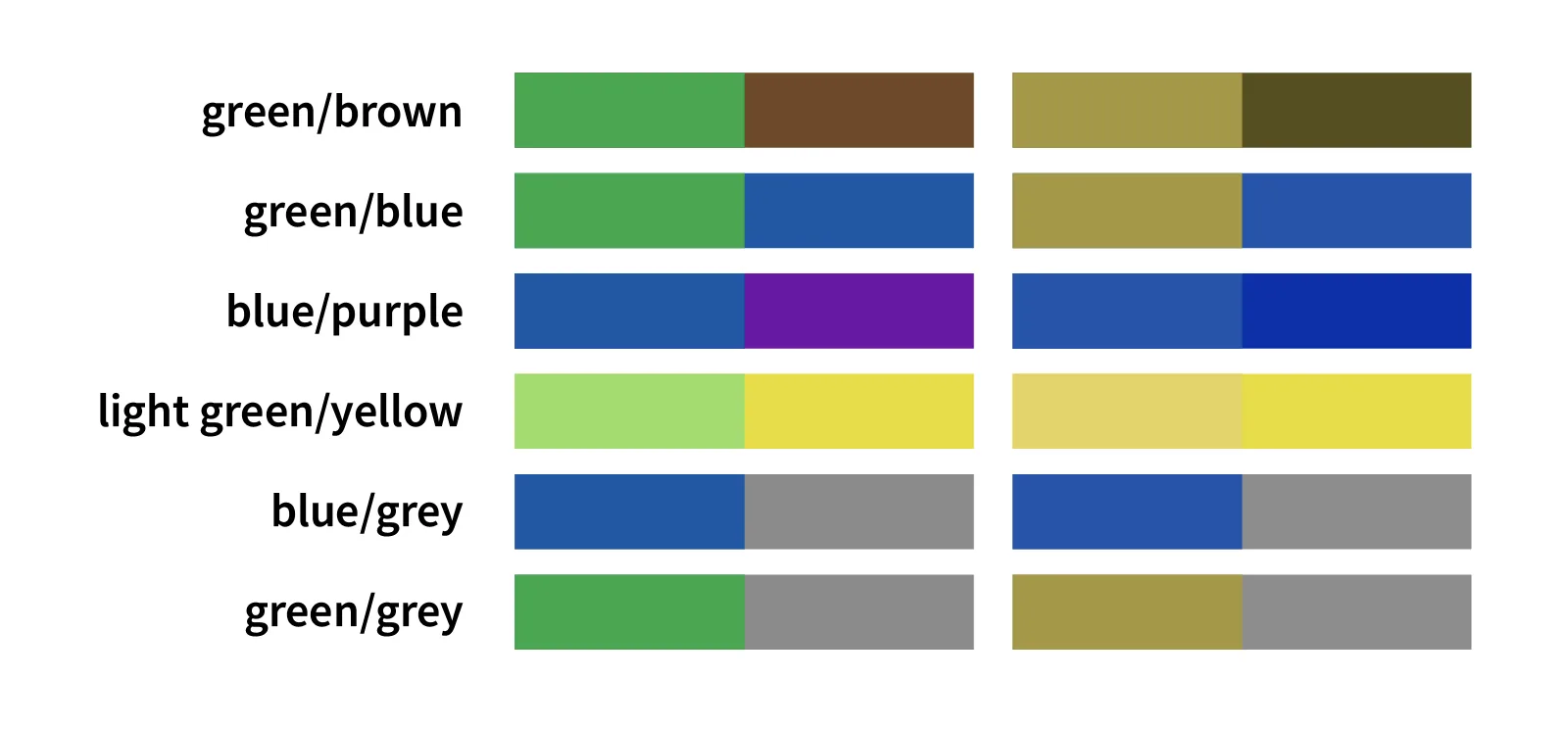
- Avoid “green” and “red” alert messages. Success and error messages are frequently colored or shaded green and red, respectively. As mentioned before, most colorblind people have trouble with green and red. Therefore they will automatically correlate different hues with distinct meanings. However, utilizing prefix text such as “Success,” “Error,” “Warning, ” or including an icon makes it quick and easy for anyone to understand.
- Avoid having these color combinations when possible:
- green/red
- green/brown
- blue/purple
- green/blue
- light green/yellow
- blue/gray
- green/gray
- green/black




Final Thoughts
Website accessibility is essential for all aspects of the user experience as it makes websites inclusive and usable for everyone and helps drastically improve your SEO efforts.
The tips I shared in this post are not exhaustive and may not apply to your situation. However, they cover the majority of problems many people experience when using websites.
Contact me today if you want to know more about your website’s performance and possible recommendations. I would be happy to look at your site and give you some honest feedback.
Written By: Adam Bennett | February 23, 2023
Adam is the president and founder of Cube Creative Design and specializes in private school marketing. Since starting the business in 2005, he has created individual relationships with clients in Western North Carolina and across the United States. He places great value on the needs, expectations, and goals of the client.